Iperf 2 User Manual
Version 2.2.2 — 30 August 2026 — iperf2 project, derived from NLANR/DAST iperf
1. Introduction ⇧ top
Iperf 2 is a network performance measurement tool that generates and receives TCP and UDP traffic between a client and a server. It measures throughput, latency (one-way delay and round-trip time), jitter, packet loss, and many other metrics at the socket level. All reported byte and packet counts reflect what the socket API observed; they do not include lower-layer protocol header overhead (IP headers, TCP/UDP headers, Ethernet framing, etc.). Its multi-threaded design allows it to scale from Wi-Fi testing to 100 Gbps links with thousands of parallel streams.
A test requires two instances: one running in server mode (-s) to receive traffic, and one in client mode (-c host) to generate and send it. The client and server may be on the same host or on different hosts.
2. Iperf 2 vs Iperf 3 ⇧ top
Iperf3 is a separate project hosted at https://github.com/esnet/iperf. Both tools measure network performance but they share no protocol compatibility and have different feature sets.
| Feature | Iperf 2 | Iperf 3 |
|---|---|---|
| Traffic Types | ||
| TCP traffic | Y | Y |
| UDP traffic | Y | Y |
| UDP L4S traffic (ECT(1)/L4S marking, Prague or Reno response) | Y (--udp-l4s) | N |
| SCTP traffic | N | Y |
| IPv4 | Y | Y |
| IPv6 | Y | Y |
| Multicast traffic (including SSM) | Y | N |
| TCP connect only | Y | N |
| Layer 2 checks | Y | N |
| Output Options | ||
| Human-readable format | Y | Y |
| JSON output | N | Y |
| CSV (basic) | Y | N |
| Hide IP addresses in output | Y (v4 only) | N |
| Client-side server reports | Y | Y |
| Traffic Profiles | ||
| Fair-queue rate limiting | Y | Y |
| Write rate limiting | Y | Y |
| Read rate limiting (TCP) | Y | N |
| Bursts | Y | Y |
| Isochronous (video) TCP/UDP | Y | N |
| Reverse roles | Y | Y |
| Bidirectional traffic | Y | Y |
| Full duplex same socket | Y | N |
| Bounceback (request/reply RPS-responsiveness test), TCP or UDP L4S | Y (--bounceback) | N |
| Concurrent working load(s) alongside bounceback | Y (--working-load) | N |
| Runtime pause/resume of a working load (SIGUSR1/SIGUSR2), any direction/transport | Y | N |
| Low duty cycle traffic with server-side stats | Y | N |
| TCP_NOTSENT_LOWAT with select() (--tcp-write-prefetch) | Y | N |
| TCP near-congestion / L4S (ECN, DualPI2 awareness) | Y (--udp-l4s, --near-congestion) | N |
| UDP L4S support with ECN CE marking stats | Y (--udp-l4s) | N |
| Peer version detection | Y (-X) | N |
| TCP congestion control algorithm selection | Y (-Z / --cca) | Y (-C) |
| Variable/random packet length distributions (Markov chain) | Y | N |
| Simulated network delay per flow (TCP_TX_DELAY / SO_TXTIME) | Y (--send-delay) | N |
| Port range support (-p m-n) | Y | N |
| UDP batching via sendmmsg/recvmmsg | Y | N |
| UDP GSO / GRO path | N | Y, since iperf3 3.21 |
| Metrics | ||
| Throughput | Y | Y |
| Responsiveness per second (RPS) | Y | N |
| UDP packets (total / lost) | Y | Y |
| UDP jitter | Y | Y |
| Packet latencies (UDP) | Y | N |
| Frame / burst latencies (TCP/UDP) | Y | N |
| Write-to-read latencies (TCP) | Y | N |
| Network power (latency/throughput) | Y | N |
| InP — bytes in queues (Little's law) | Y | N |
| TCP CWND | Y | N |
| TCP retries | Y | Y |
| TCP RTT | Y | Y |
| Send-side write-delay histograms | Y | N |
| UDP packets per second | Y | N |
| Latency histograms | Y | N |
| TCP connect times | Y | N |
| ECN CE mark counts (received CE-marked packets) | Y (--udp-l4s) | N |
| Bounceback per-direction loss attribution (request vs. reply) | Y | N |
| Bounceback one-way-delay (OWD) / asymmetry, incl. clock-offset-tolerant relative OWD | Y (--trip-times) | N |
| Other | ||
| Multi-threaded parallel tests | Y (always) | Y, since iperf3 3.16 |
| Parallel -P implementation | Threads | Threads per stream since 3.16 (processes in earlier versions) |
| Real-time scheduling | Y | N |
| -t (time limit) support for server | Y | N |
| TAP virtual interface support (--tap-dev) | Y | N |
| CPU affinity | N | Y |
| Zero copy | N | Y |
| IPv6 Flow label | N | Y |
| --omit (skip first N seconds) | Y | Y |
| Incr dst/src IP/port with -P | Y | N |
| Device / interface binding | Y | Y |
| Source port binding | Y | Y |
| MPTCP support | N | Y |
| Scheduled tx start time | Y | N |
| Permit keys (TCP, UDP, and Bounceback, professional edition) | Y | N |
| Python asyncio framework (flows/) | Y | N |
| Scaling to 1000+ threads | Y | N/A |
| Official Android client app | Y (this project) | N (third-party wrappers only) |
| Official native Windows build | Y | N (third-party builds only) |
3. Installation ⇧ top
Building from Source
Iperf 2 uses the standard GNU autotools build system:
./configure
make -j
sudo make install
The binary is placed in src/iperf before installation. On most distributions iperf 2 is also available as a package named iperf (not iperf3).
Configure Flags
- --enable-professional
- Enable the professional feature set. Currently enables UDP L4S support (Prague congestion control,
--udp-l4s) and tags the version string with the professional branch label. This is the sole gate for UDP L4S support - there is no separate flag for it. - --enable-fastsampling
- Enable higher-precision interval reporting, including four-digit timestamp precision (e.g.
1.0000seconds). Useful for sub-millisecond-ireport intervals. - --enable-thread-debug
- Enable asserts and advanced threading diagnostics. See Section 10.
- --disable-write-select
- Disable the
select()call before writes. Can improve UDP performance at very high packet rates. - --enable-summing-debug
- Enable interval summing diagnostics for debugging parallel stream aggregation.
4. Synopsis ⇧ top
iperf -c server [options]
iperf -u -s [options]
iperf -u -c server [options]
5. General Options ⇧ top
These options apply to both server and client.
- -b, --bandwidth n[kmgKMG][,stdev] | npps
- Set the target bandwidth. Supports bits/sec (default) or packets/sec (
ppssuffix). Setting-b 0disables rate limits (useful for UDP capacity testing). On the server, limits read rate (TCP only). Supports variable loads asmean,stdevdrawn from a log-normal distribution, e.g.-b 100m,10m. - -e, --enhanced
- Display enhanced output in reports. Provides all available metrics (write counts, retries, CWND, RTT, NetPwr, PPS, etc.) instead of the legacy 2.0.5 format.
- -f, --format [abkmgBKMG]
- Format for reported values: adaptive, bits, Bytes, kbits, mbits, gbits, KBytes, MBytes, GBytes.
- -h, --help
- Print a help synopsis.
- --hide-ips
- Obscure IP addresses in output (useful when publishing results). IPv4 only.
- -i, --interval <t | f>
- Report interval in seconds (default), or per frame/burst when
fis given. Frame interval reporting is experimental. Combine with--enable-fastsamplingfor sub-millisecond intervals. - -l, --len n[kmKM]
- Read/write buffer size (TCP default 128K, UDP default 1470 bytes). Also supports Bra-ket notation for Markov chain packet length distributions. See Bra-ket Notation.
- --l2checks
- Perform layer 2 length checks on received UDP packets. Requires packet socket support (Linux only).
- -m, --print_mss
- Print TCP maximum segment size.
- --NUM_REPORT_STRUCTS count
- Override the default shared memory size (10000) between traffic and reporter threads. Increase if you see "reporter thread too slow" warnings on >1 Gb/s networks.
- --omit n
- Omit the first n seconds of samples from the final report (TCP only).
- -o, --output filename
- Redirect report and error output to a file.
- --permit-key[=value]
- Set a shared key that the server and client must both present for a connection to be accepted. TCP only. Requires the professional edition on the server — a community edition server refuses to start with this option set. A community edition client may still send a key to reach someone else's professional-edition server. See server and client option sections for details.
- -p, --port m[-n]
- Set server listen port or client destination port (default 5001). Supports port ranges (e.g.
-p 6002-6008). See Port Ranges. - --set-rand-seed n
- Set the random number generator seed to n for reproducible variable-load tests.
- --send-delay n
- Simulate network delay on the socket using
TCP_TX_DELAYorSO_TXTIME. Units are milliseconds. Requires the FQ packet scheduler. See send-delay Notes. - --sum-dstip
- Aggregate parallel traffic threads by destination IP (default is source IP).
- --sum-only
- Display sum reports only; suppress per-thread reports. Useful with large
-Pvalues. - -t, --time n
- Duration for listening, receiving, or sending traffic (seconds).
- -u, --udp
- Use UDP instead of TCP.
- --utc
- Use Coordinated Universal Time (UTC) in timestamp outputs.
- -w, --window n[kmKM]
- Set the TCP window size (socket buffer size).
- -z, --realtime
- Request real-time scheduler priority, if supported by the OS.
- -B, --bind host[:port][%dev]
- Bind to a specific IP address, optional port, and optional network device. See Binding Notes.
- -C, --compatibility
- Compatibility mode for older iperf versions; suppresses extra exchange messages.
- -M, --mss n
- Set TCP maximum segment size via
TCP_MAXSEG. - -N, --nodelay
- Disable Nagle's algorithm (set
TCP_NODELAY). - -v, --version
- Print version information and quit.
- -x, --reportexclude [CDMSV]
- Exclude report types: Connection, Data, Multicast, Settings, Version.
- -y, --reportstyle C|c
- Report results as CSV (comma-separated values).
- --cca, -Z, --tcp-congestion algo
- Set the TCP congestion control algorithm. Requires
setsockopt TCP_CONGESTIONsupport. Available algorithms depend on the OS (seesysctl tcp_allowed_congestion_control). May require root.--tcp-ccais a deprecated alias for--cca.
6. Server Options ⇧ top
Start the server with iperf -s (TCP) or iperf -s -u (UDP).
- -s, --server
- Run in server mode. The server listens for connections from clients.
- -1, --singleclient
- Process only one client at a time (serialize connections).
- -b, --bandwidth n[kmgKMG]
- Limit the server read rate to n bits/sec (TCP only).
- -t, --time n
- Time in seconds to listen for new connections and/or receive traffic. Defaults to infinite. Recommended for multicast and --no-udp-fin.
- --histograms[=binwidth[u],bincount,[lowerci],[upperci]]
- Enable latency histograms for UDP packets, TCP writes (with
--trip-times), isochronous traffic, or bounceback. Default: 1 ms bin width, 10000 bins, 5%/95% confidence intervals. Appendufor microseconds,mfor milliseconds. - --jitter-histograms[=binwidth]
- Enable jitter histograms for UDP. Optional bin width in microseconds (default 100 μs).
- --permit-key[=value]
- Require clients to present a matching permit key. If no value is given, the server auto-generates one and displays it in the settings report. Key lifetime is set with
--permit-key-timeout(default 20 s). TCP only. Requires the professional edition — a community edition server refuses to start with this option set. - --permit-key-timeout n
- Set the permit key lifetime in seconds. Zero disables the timer. Requires the professional edition, same as
--permit-key. - --permit-key-file[=path]
- (Server only) Load a list of valid permit keys from a file, in addition to (or instead of) the single
--permit-keyvalue. File format is systemdEnvironmentFile=-compatible:NAME=VALUElines,#comments, blank lines ignored; any line whoseNAMEcontainsPERMIT_KEYcontributes itsVALUEas one valid key, so a file already used for a systemd unit'sEnvironmentFile=(e.g. holdingPERMIT_KEY=<value>) can be pointed at directly, and adding more such lines extends the accepted list. Send the server processSIGHUPto reload the file without a restart — useful for rotating in a new key (or revoking an old one) without dropping already-connected clients using still-valid keys. If no value is given,/etc/iperf2/permit-keys.envis used. Requires the professional edition, same as--permit-key. - --permit-key-hmac-window seconds
- (Server only) How far a client's
--permit-key-hmactimestamp may drift from the server's own clock before an otherwise-valid HMAC is rejected. Defaults to 30 seconds. Only relevant when a client presents an HMAC1-format value (see--permit-key-hmacunder Client Options below); has no effect on legacy plaintext--permit-keyclients. - --recvmmsg #[0–1024]
- (Server only, Linux only) Use the
recvmmsg(2)syscall to receive # UDP datagrams per call. Reduces per-datagram syscall overhead at high packet rates. A value of 0 (or negative) falls back to the regularrecvmsg(2)API. Requires-u. The Read column in reports shows actualrecvmmsgsyscall counts; PPS / Read gives average datagrams per call. See sendmmsg/recvmmsg Examples. - --recvmmsg-wait-all
- Pass
MSG_WAITALLtorecvmmsg(2), blocking until the full burst is received. Use with--recvmmsg. - --recvmmsg-time #
- Set the
recvmmsg(2)timeout in milliseconds. Use with--recvmmsg. - --recvlowat #[bytes]
- Set
SO_RCVLOWATin bytes. The kernel will not wake the application until at least this many bytes are in the receive buffer. Reduces wake-ups when used with--recvmmsg. - --skip-rx-copy
- Set
MSG_TRUNCon recv calls to discard received bytes, reducing CPU load on the receiver. - --tap-dev dev
- Receive traffic on the specified TAP virtual interface.
- --tcp-rx-window-clamp n[kmKM]
- Set
TCP_WINDOW_CLAMPin bytes. - --test-exchange-timeout n
- Maximum wait time in seconds for the client-server test exchange. Shares its underlying timer with
--permit-key-timeout(whichever value is larger wins); with neither set, there is no timeout at all. Zero disables. - --tos-override val
- Set the IP_TOS value for reverse or full-duplex traffic on the server side. Useful for simulating network bleaching of the TOS byte on the return path.
- --cca
- Override the client's congestion control algorithm selection (same as
--tcp-congestion).--tcp-ccais a deprecated alias for--cca. - --dual-transport
- Also listen for whichever of TCP/UDP L4S this process isn't already the main listener for, on the adjacent port (e.g. TCP on port N also gets UDP L4S on N+1, UDP L4S on port N also gets TCP on N−1). Implies
-e. Point the server at the adjacent port this way to receive a--working-load-transport udp-l4sstream alongside a TCP main test (or vice versa) without running a second server process. - --working-load
- Enable support for concurrent TCP working loads alongside UDP traffic streams.
- --working-load-cca
- Set the CCA for TCP working loads (overrides client-side setting); under
--working-load-transport udp-l4s, selects that stream's own UDP L4S congestion response (pragueorreno) instead. - -R, --remove
- Remove the IPerfService on Windows. (Note: on the client,
-Rmeans--reverse; these are distinct uses of the same flag.) - -D, --daemon
- Run the server as a daemon. On Windows, installs and runs as IPerfService.
- -H, --ssm-host host
- Set the source host IP address for source-specific multicast (SSM), i.e. the S in (S,G).
- -U, --single_udp
- Run in single-threaded UDP mode.
- -V, --ipv6_domain
- Enable IPv6 reception by setting the domain and socket to AF_INET6 (can receive on both IPv4 and IPv6).
7. Client Options ⇧ top
Start the client with iperf -c server.
- -c, --client host[%dev]
- Run in client mode, connecting to host. The optional
%devusesSO_BINDTODEVICEto force traffic out a specific interface (requires root). - -b, --bandwidth n[kmgKMG][,stdev] | npps
- Set target bandwidth (default 1 Mbit/s) or packets per second. Supports mean,stdev for variable loads. Use
-b 0for unlimited / capacity-seeking (TCP or UDP). - -t, --time n | 0
- Duration in seconds to transmit traffic. Zero means run forever (default 10 s).
- -n, --num n[kmKM]
- Number of bytes to transmit instead of a time limit.
- -P, --parallel n
- Number of parallel client threads.
- -r, --tradeoff
- Bidirectional test: client-to-server first, then server-to-client.
- -d, --dualtest
- Bidirectional test using two simultaneous unidirectional sockets.
- -R, --reverse
- Reverse the traffic flow (server sends to client). Useful for testing through NAT firewalls. See Reverse & Full Duplex.
- --full-duplex
- Run full-duplex traffic (transmit and receive) on the same socket simultaneously.
- --sendmmsg #[0–1024]
- (Client only, Linux only) Use the
sendmmsg(2)syscall to send # UDP datagrams per call. The sender always fills the array fully before issuing the syscall, yielding a dramatic reduction in syscall overhead. A value of 0 (or negative) falls back to the regularsendmsg(2)API. The Write column shows actualsendmmsgsyscall counts; PPS / Write gives average datagrams per call. Requires-u. See sendmmsg/recvmmsg Examples. - --trip-times
- Enable end-to-end write-to-read latency measurements. Requires synchronized clocks on client and server. See Clock Synchronization.
- --tcp-write-times
- Measure socket write times (select + write latencies).
- --tcp-write-prefetch n[kmKM]
- Set
TCP_NOTSENT_LOWATand use event-based writes viaselect(). - --tcp-quickack
- Set
TCP_QUICKACKon the socket. - --bounceback[=n]
- Run a TCP bounceback / responsiveness test. The client sends small writes (default 100 bytes, 10 per period) and times the round-trip. Results show responses per second (RPS) and latency. See Bounceback Notes.
- --bounceback-hold n
- Request the server to insert a delay of n milliseconds between its read and write.
- --bounceback-no-quickack
- Request the server not set
TCP_QUICKACKduring bounceback (disables TCP ACK delay suppression). - --bounceback-period[=n]
- Schedule client sends every n seconds (default 1 s). Zero means continuous back-to-back.
- --bounceback-request n
- Set the bounceback request size in bytes (default 100).
- --bounceback-reply n
- Set the bounceback reply size in bytes (default: same as request). Supports asymmetric sizes.
- --bounceback-txdelay n
- Delay n seconds between the start of the working load and the bounceback traffic.
- --burst-period n
- Set the burst period in seconds (default 1 s). Intended for low duty-cycle burst traffic.
- --burst-size n
- Set the burst size in bytes (default 1M).
- --connect-only[=n]
- Perform only TCP connects (3WHS) without data transfer. Useful for measuring connect times. Optional n is the total number of connects (zero = forever).
- --connect-retry-time n
- Application-level retry duration in seconds for failed TCP connects.
- --connect-retry-timer n
- Minimum time in seconds between TCP connect retries.
- --dscp
- Set the DSCP field (6 bits, masking ECN) in the IP TOS byte. See IP TOS / DSCP.
- --fq-rate n[kmgKMG]
- Set a fair-queue socket pacing rate (
SO_MAX_PACING_RATE) in bytes or bits per second. - --fq-rate-step n[kmgKMG]
- Step the fq-rate by n per interval (see
--fq-rate-step-interval). - --fq-rate-step-interval n
- Time in seconds between fq-rate steps (default 1 s).
- --histograms[=binwidth[u],bincount,[lowerci],[upperci]]
- Enable select()/write() histograms with
--tcp-write-timesor--bounceback. Default: 100 μs bin width, 100000 bins, 5%/95% CI. - --ignore-shutdown
- End the test on the final write rather than waiting for TCP FIN/FIN-ACK drain.
- --incr-dstip
- Increment the destination IP for each parallel thread (
-P) or port range. - --incr-dstport
- Increment the destination port for each parallel thread or port range.
- --incr-srcip
- Increment the source IP for each parallel thread or port range.
- --incr-srcport
- Increment the source port for each parallel thread (requires
-Bto set source port). - --ipg n
- Set the inter-packet gap to n seconds. For packets or within a burst when
--isochronousis set. - --isochronous[=fps:mean,stdev]
- Send isochronous traffic: fps frames per second with load drawn from a log-normal distribution parameterized by mean and stdev. Default:
60:20m,0. Supports packet-count bursts with thepsuffix, e.g.2:25p= two 25-packet bursts per second. - --local-only[=1|0]
- Restrict traffic to the local network via
SO_DONTROUTE. - --near-congestion[=n]
- Enable TCP write rate limiting based on sampled RTT. The delay multiplier defaults to 0.5. Experimental; best used on controlled test networks.
- --no-connect-sync
- Disable the default synchronization barrier that ensures all parallel threads (
-P) complete their TCP connects before any begin sending. - --no-udp-fin
- Skip the UDP final server-to-client exchange. Highly recommended to set
-ton the server when using this option. - --permit-key[=value]
- Present a permit key that must match the server's value. TCP only. No professional-edition restriction on the client - a community edition build can send a key to reach someone else's professional-edition server; only the server side requires the professional edition to enforce
--permit-keyat all. - --permit-key-hmac
- Use the
--permit-keyvalue as an HMAC-SHA256 key instead of sending it directly: the wire value becomes a timestamped HMAC (HMAC1:<ts>:<hmac>) rather than the raw secret, so a captured value can only be replayed for--permit-key-hmac-windowseconds instead of indefinitely. Requires--permit-keywith a value; ignored with a warning otherwise. The server verifies an HMAC1-format value whenever one is presented, with no server-side flag needed. - --sync-transfer-id
- Pass the client's transfer ID(s) to the server so both display the same ID in their reports.
- --txdelay-time n
- Delay n seconds after TCP connect and before the first write. For UDP, delay between thread start and first write.
- --txstart-time n.n
- Schedule traffic to start at a specific Unix epoch time (microsecond resolution). Example:
--txstart-time $(expr $(date +%s) + 1).$(date +%N) - --udp-l4s
- Run an L4S (Low Latency Low Loss Scalable Throughput) traffic load. Client-only - on the server, use plain
-uinstead; L4S is negotiated per-connection from the client's own request, so a plain-userver already serves both L4S and non-L4S UDP clients. Requires an iperf 2 server compiled with L4S support. See--ccato select the congestion response. - --cca prague|reno, under --udp-l4s
- Select the UDP L4S congestion response.
prague(default) reduces window/rate proportionally to the smoothed CE-marking probability.renostill marks packets ECT(1)/L4S-capable on the wire, but ignores CE marks for congestion response and reacts only to loss with a flat halving - emulating a legacy/Classic congestion-controlled flow sharing an L4S-capable queue, useful for A/B-comparing what L4S marking actually buys you over the same path.--tcp-ccais a deprecated alias for--cca. - --working-load[=up|down|bidir[,n]]
- Request a concurrent working load alongside the primary traffic - TCP stream(s) by default, or UDP L4S (see
--working-load-transport). Defaults to bidirectional, 1 stream. Example:--working-load=down,4uses 4 server-to-client TCP streams. Working load traffic uses IP ToS BE (0x0). Sending the client processSIGUSR1pauses the working-load stream's own writes (without tearing its connection down) for as long as the signal stays in effect;SIGUSR2resumes it. The main traffic flow (a bounceback probe alongside the working load, in the common case) is never affected by either signal, only the working-load stream itself. Covers every direction: forup(and bidir's own upload half) the client's own writer thread is paused directly; fordown(and bidir's own download half) the real writer is server-spawned and unreachable by a signal to the client, but the client locally reverses roles for that direction and owns the reader instead - pausing it stalls the remote writer via plain TCP backpressure, or, under--working-load-transport udp-l4s, via a pause flag relayed over the wire with a keepalive heartbeat so the writer's own dead-peer timeout doesn't fire during an extended pause. - --working-load-cca
- Set the CCA for TCP working loads; under
--working-load-transport udp-l4s, selects that stream's own UDP L4S congestion response (pragueorreno) instead, independent of the main flow's own--ccachoice. - --working-load-transport tcp|udp-l4s
- Select the transport used by the working load stream(s). A UDP L4S working load runs on the adjacent port from the main test (main port +1 if the main test is TCP, −1 if the main test is itself UDP L4S) - point the server at that adjacent port with
--dual-transportso it has a listener bound there to receive it. - -B, --bind ip[:port] | ipv6 -V
- Bind source IP address and optional source port. See Binding Notes.
- -F, --file_input name
- Read data to transmit from a file.
- -I, --stdin_input
- Read data to transmit from stdin.
- -L, --listenport n
- Port to receive bidirectional test return traffic.
- -S, --tos val
- Set the IP_TOS byte. Values 2.1.5+ reflect this setting in reverse/full-duplex traffic. See IP TOS / DSCP.
- -T, --ttl n
- Time-to-live for multicast (default 1).
- -V, --ipv6_domain
- Set the domain to IPv6.
- -X, --peer-detect
- Run peer version detection prior to traffic.
8. Examples ⇧ top
TCP Client (enhanced)
iperf -c 192.168.1.35 -e -i 1
------------------------------------------------------------
Client connecting to 192.168.1.35, TCP port 5001 with pid 256370 (1/0 flows/load)
Write buffer size: 131072 Byte
TCP congestion control using cubic
TOS set to 0x0 (dscp=0,ecn=0) (Nagle on)
TCP window size:  100 MByte (default)
------------------------------------------------------------
[  1] local 192.168.1.103%enp4s0 port 41024 connected with 192.168.1.35 port 5001
      (sock=3) (icwnd/mss/irtt=14K/1448/158) (ct=0.21 ms) on 2024-03-26 10:48:47.867 (PDT)
[ ID] Interval        Transfer    Bandwidth       Write/Err  Rtry     InF(pkts)/Cwnd(pkts)/RTT(var)        NetPwr
[  1] 0.00-1.00 sec   201 MBytes  1.68 Gbits/sec  1605/0        73     1531K(1083)/1566K(1108)/13336(112) us  15775
[  1] 1.00-2.00 sec   101 MBytes   846 Mbits/sec   807/0         0     1670K(1181)/1689K(1195)/14429(83) us   7331
[  1] 0.00-10.78 sec  1.18 GBytes   941 Mbits/sec  9674/0        74        0K(0)/1681K(1189)/14424(111) us   8154
| ct= | TCP connect time (3-way handshake) |
| Write/Err | Successful socket writes / non-fatal write errors |
| Rtry | TCP retransmits |
| InF(pkts)/Cwnd(pkts)/RTT(var) | Bytes&pkts in-flight, congestion window bytes&pkts, round-trip time and variance (μs) |
| NetPwr | Network power = throughput / RTT |
TCP Server (enhanced)
iperf -s -e -i 1 -l 8K
[ ID] Interval        Transfer    Bandwidth       Reads   Dist(bin=1.0K)
[  4] 0.00-1.00 sec   124 MBytes  1.04 Gbits/sec  22249    798:2637:2061:767:2165:1563:589:11669
[  4] 0.00-10.02 sec  1.25 GBytes  1.07 Gbits/sec  227306   9316:22088:21792:7096:22893:17193:6138:120790
| Reads | Total socket reads per interval |
| Dist(bin=size) | 8-bin histogram of socket read return sizes. Bins are separated by colons. In this example with -l 8K, bins are 0–1K, 1K–2K, …, 7K–8K. |
TCP Client with --reverse (relayed RTT/bytes-in-flight)
iperf -c host -R -e -i 1
[ ID] Interval        Transfer    Bandwidth       Reads=Dist             InF(pkts)  RTT(ms)
[  1] 0.00-1.00 sec   66.9 MBytes   561 Mbits/sec  8734=13:22:5:1:8693:0:0:0    1685K(1192)   15.100
| InF(pkts) | Bytes&pkts in-flight (KB(pkts)), same units as the write side's InF(pkts)/Cwnd(pkts)/RTT(var) column above |
| RTT(ms) | Round-trip time in milliseconds |
Normally the reader in a --reverse test can't observe these sender-side-only TCP_INFO stats locally, since it's the server that's writing. The server samples its own gettcpinfo() after every write and relays bytes/packets-in-flight and RTT back to the client over the existing write header, so the client's own enhanced report can show them - no separate connection or protocol needed. The CSV form (-y C) carries the same three values as tcpbytesinflight, tcppktsinflight, and tcprtt (raw microseconds, unlike the millisecond-converted human-readable form above).
TCP Server with Trip Times
iperf -s -i 1 -w 4M     # server
iperf -c host --trip-times -e -i 1   # client
[ ID] Interval        Transfer    Bandwidth    Burst Latency avg/min/max/stdev (cnt/size) inP NetPwr  Reads=Dist
[  4] 0.00-1.00 sec  19.0 MBytes   159 Mbits/sec  52.314/10.238/117.155/19.779 ms (151/131717) 1.05 MByte 380.19  781=306:253:129:48:18:15:8:4
| Burst Latency | One-way TCP write()-to-read() latency: avg/min/max/stdev (ms). Requires synchronized clocks. |
| cnt / size | Number of completed bursts / average burst size (bytes) |
| inP | Average bytes in-flight (Little's law). See Little's Law. |
| NetPwr | Network power = throughput / one-way latency |
TCP Client with Clock Sync Check (-X --trip-times)
iperf -c 192.168.1.4 -X -e --trip-times -i 1 -t 2
[  1] Clock sync check (ms): RTT/Half=(3.361/1.680) OWD-send/ack/asym=(2.246/1.115/1.131)
[  1] local 192.168.1.1%ap0 port 47466 connected with 192.168.1.4 port 5001 (MSS=1448) (trip-times)
The clock sync check line shows the estimated RTT, half-RTT, one-way delays, and asymmetry. A large asymmetry value indicates the clocks may not be well-synchronized.
UDP Client (enhanced)
iperf -c <host> -e -i 1 -u -b 10m
[ ID] Interval        Transfer     Bandwidth      Write/Err  PPS
[  3] 0.00-1.00 sec  1.19 MBytes  10.0 Mbits/sec  852/0      851 pps
[  3] 0.00-10.00 sec  11.9 MBytes  10.0 Mbits/sec  8504/0      850 pps
[  3] Server Report:
[  3] 0.00-10.00 sec  11.9 MBytes  10.0 Mbits/sec   0.047 ms    0/ 8504 (0%)
      0.537/0.392/23.657/0.497 ms  850 pps  2329.37
| Write/Err | Successful socket writes / non-fatal write errors |
| PPS | Transmit packet rate (packets per second) |
| Server Report | Jitter (ms), lost/total datagrams (%), latency avg/min/max/stdev (ms), PPS, NetPwr |
UDP Server with Trip Times
iperf -s -i 1 -w 4M -u
[ ID] Interval        Transfer     Bandwidth        Jitter   Lost/Total
      Latency avg/min/max/stdev PPS  inP NetPwr
[  3] 0.00-1.00 sec  44.5 MBytes   373 Mbits/sec   0.071 ms 52198/83938 (62%)
      75.185/2.367/85.189/14.430 ms 31854 pps 3.64 MByte 620.58
| Latency | End-to-end latency avg/min/max/stdev (ms). Requires --trip-times on client and synchronized clocks. |
| PPS | Received packet rate |
| inP | Bytes in progress (Little's law) |
| NetPwr | Network power = throughput / latency |
Isochronous UDP (video simulation)
iperf -c 192.168.100.33 -u -e -i 1 --isochronous=60:100m,10m --realtime   # client
iperf -s -e -u --histograms=100u,2000 --realtime                             # server
# Note: --udp-histogram is a legacy alias for --histograms on the server
# Client interval report:
[ ID] Interval        Transfer     Bandwidth      Write/Err  PPS  frames:tx/missed/slips
[  3] 0.00-1.00 sec  12.0 MBytes   101 Mbits/sec  8615/0     8493 pps   62/0/0

# Server summary:
[  3] 0.00-9.98 sec   120 MBytes   101 Mbits/sec   0.010 ms  196/85867 (0.23%)
      0.665/0.083/1.318/0.284 ms 8585 pps  18903.85  601/1
[  3] T8(f)-PDF: bin(w=100us):cnt(85671)=... (5.00/95.00%=3/12,...)
[  3] F8(f)-PDF: bin(w=100us):cnt(598)=...  (5.00/95.00%=17/24,...)
| frames:tx/missed/slips | Total isochronous frames sent / frame IDs not sent / frame slips |
| T8-PDF | Latency histogram for individual packets |
| F8-PDF | Latency histogram for entire frames (bursts) |
Markov Chain UDP (variable packet length)
iperf -c 192.168.1.35 -u --len '<256|0.1,0.7,0.2<1024|0.2,0.5,0.3<1470|0.4,0.4,0.2' \
      -i 1 -b 50kpps -e
[  1] 0.00-1.00 sec  45.7 MBytes   383 Mbits/sec  50000/0/0   50000 pps
[  1] 256=256(0,0)|0.100/0.100(11410/0.100) 1024(0,1)|0.700/0.800(79604/0.699)
      1470(0,2)|0.200/1.000(22805/0.200)  113819/500002(22.8%)
The Markov summary lines show each state (packet length), transition probabilities, actual transition counts, and actual vs. configured probabilities. See Bra-ket Notation.
sendmmsg / recvmmsg (batched UDP syscalls)
# Client — batched sending
iperf -c <host> -u --sendmmsg 1024 -b 1Mpps -i 1 -e -l 40
------------------------------------------------------------
Client connecting to <host>, UDP port 5001
Sending 40 byte datagrams, IPG target: 0.00 us (kalman adjust)
Num. of send mmsg array: 1024
------------------------------------------------------------
[ ID] Interval        Transfer     Bandwidth   Write/Err/Timeo  PPS
[  1] 0.00-1.00 sec  14.0 MBytes   118 Mbits/sec   360/0/0  367617 pps
[  1] 1.00-2.00 sec  14.0 MBytes   118 Mbits/sec   359/0/0  367616 pps
[  1] 0.00-10.01 sec   139 MBytes   116 Mbits/sec   3552/0/0  330566 pps
With --sendmmsg 1024, the Write column counts sendmmsg(2) syscalls, not datagrams. PPS / Write = 367617 / 360 ≈ 1022 — the 1024-slot array is nearly full on every call.
# Server — batched receiving
iperf -s -u --recvmmsg 1024 -e -i 1 -l 40
------------------------------------------------------------
Server listening on UDP port 5001
Num. of recv mmsg array: 1024, wait-all:0, wait time: NULL
------------------------------------------------------------
[ ID] Interval        Transfer     Bandwidth        Jitter   Lost/Total
      Latency avg/min/max/stdev PPS Read/Timeo/NA NetPwr
[  1] 0.00-1.00 sec  14.0 MBytes   117 Mbits/sec   0.001 ms 0/367058 (0%)
      1.830/0.382/3.229/0.766 ms 367058 pps 19688/0/0 8022
[  1] 0.00-10.01 sec   139 MBytes   116 Mbits/sec   0.005 ms 0/3636226 (0%)
      1.846/0.352/3.526/0.775 ms 330566 pps 179667/0/0 7873
The Read column counts recvmmsg(2) syscalls. PPS / Read = 367058 / 19688 ≈ 19: the server can only harvest datagrams already queued in the kernel buffer at the time of the call, so the array fills to roughly 2% of 1024. The sender controls its call timing and always fills the array fully.
--recvmmsg 1024 increases average latency from roughly 0.5 ms (without mmsg) to roughly 1.85 ms, because the receiver waits longer for datagrams to accumulate before returning from the syscall. These numbers reflect this specific test environment; actual latency impact will vary. Use --recvmmsg-wait-all or --recvmmsg-time to trade latency for higher fill depth.
Bounceback / Responsiveness Test
iperf -c host.domain.com -i 1 --bounceback --permit-key=mytest --hide-ips
[ ID] Interval        Transfer    Bandwidth         BB cnt=avg/min/max/stdev         Rtry  Cwnd/RTT    RPS
[mytest(1)] 0.00-1.00 sec  1.95 KBytes  16.0 Kbits/sec  10=11.949/9.662/19.597/3.127 ms  0  14K/10930 us  83 rps
[mytest(1)] 0.00-10.02 sec  19.5 KBytes  16.0 Kbits/sec  100=10.878/9.651/19.597/1.743 ms  0  14K/11676 us  91 rps
| BB cnt=avg/min/max/stdev | Bounceback count and round-trip latency stats (ms) |
| Rtry | TCP retransmits |
| Cwnd/RTT | TCP congestion window and round-trip time |
| RPS | Responses per second |
9. Notes ⇧ top
Numeric Suffixes
Many numeric options accept a format suffix character after the value:
| Suffix | Base | Multiplier |
|---|---|---|
| k | 103 | 1,000 |
| m | 106 | 1,000,000 |
| g | 109 | 1,000,000,000 |
| K | 210 | 1,024 |
| M | 220 | 1,048,576 |
| G | 230 | 1,073,741,824 |
Lowercase suffixes are SI (powers of 10); uppercase suffixes are binary (powers of 2).
Rate Limiting
The -b option limits write rate (client) or read rate (server, TCP only) at the application level. Variable offered loads are supported with the mean,stdev format using a log-normal distribution (e.g. -b 100m,10m). Socket-level pacing via SO_MAX_PACING_RATE is available with --fq-rate and works with --reverse and --full-duplex.
IP TOS / DSCP
Accepted DSCP values include: af11, af12, af13, af21, af22, af23, af31, af32, af33, af41, af42, af43, cs0–cs7, ef, le, nqb, nqb2, ac_be, ac_bk, ac_vi, ac_vo, lowdelay, throughput, reliability, a numeric value, or none.
The ac_xx values map to Wi-Fi WMM access categories per IETF RFC 8325. Setting options:
--dscpon the client sets the 6-bit DSCP field--tosor-Son client or server sets the full TOS byte--tos-overrideon the server overrides TOS for reverse/full-duplex traffic (useful to simulate network bleaching)
Clock Synchronization
The --trip-times option requires the client and server system clocks to be synchronized to a common reference. Network Time Protocol (NTP) provides millisecond accuracy; Precision Time Protocol (PTP) provides sub-microsecond accuracy. A GPS-disciplined OCXO is a recommended PTP reference. Clock synchronization errors will directly bias one-way delay measurements.
Iperf 2 can detect large clock synchronization errors during bounceback tests via the three-timestamp check: write(A) < read(B) < read(A). A non-zero error count is reported at the end of the test.
Histograms and Non-Parametric Statistics
The --histograms option captures the full sample distribution rather than just the mean/min/max. This is critical for latency analysis because real network delay distributions are typically non-Gaussian (heavy-tailed).
Reading histogram output:
[  1] 0.00-5.10 sec BB8-PDF:
bin(w=100us):cnt(50)=35:1,37:1,39:1,...,1922:1,3710:1
(5.00/95.00/99.7%=39/1000/3710,Outliers=4,obl/obu=0/0)
| BB8-PDF | Histogram name (BB8) and type (PDF = raw histogram) |
| bin(w=100us) | Bin width: 100 microseconds |
| cnt(50) | Total samples in this histogram |
| 35:1 | Bin 35 (3.4–3.5 ms) contains 1 sample |
| 5.00/95.00/99.7%=39/1000/3710 | Confidence intervals: 5% at bin 39 (3.9 ms), 95% at 100 ms, 99.7% at 371 ms |
| Outliers=4 | Samples beyond 3×IQR-equivalent fence |
| obl/obu=0/0 | Samples below / above the histogram range |
Binding
The -B option binds at layer 3 (IP address + port) using a colon separator. Binding at layer 2 (network device) uses the percent sign as the delimiter.
- Bind source IP and port:
-B 192.168.1.1:6001 - Bind source port only (OS chooses IP):
-B 0.0.0.0:6001 - Bind to device:
-c host%eth0(requires root) - IPv6 link-local requires device:
-c [fe80::1]%eth0 -V
-B controls the packet source address but does not override routing. If the routing table resolves the destination via a different interface than the -B IP's interface, the packet will exit through the routed interface with the specified source IP. Use -c host%dev or policy routing to control the physical output interface.
Reverse & Full Duplex
--reverse (-R) and --full-duplex each open one socket and use it in full duplex mode. The older -d (dualtest) and -r (tradeoff) open two sockets in opposite directions.
Use --reverse to test through NAT firewalls (the server-side sends, so the outbound connection originates from the client side). Note that NAT firewall piercing may be needed for -d and -r.
Rate limiting with --reverse: The behavior of -b differs by protocol. For TCP with --reverse, -b limits the server's read rate (because TCP has flow control and the read side can regulate the sender). For UDP with --reverse, -b applies on the transmit side, because UDP has no flow control and rate limiting must happen at the sender.
RTT/bytes-in-flight with --reverse (TCP, -e): the server relays its own gettcpinfo() sample (RTT, bytes-in-flight, packets-in-flight) back to the client on every write, so the enhanced report/CSV on the reading side shows real values instead of leaving them unavailable - see TCP Client with --reverse above.
Bounceback
The bounceback test measures network responsiveness in responses per second (RPS) — essentially the inverse of round-trip latency. The client sends small writes (default 100 bytes, 10 per second) and waits for the server to echo them back. Both TCP_NODELAY and optionally TCP_QUICKACK are set to minimize ACK delays. Use --bounceback-hold to insert a server-side processing delay and model more realistic application behavior.
Little's Law / inP
The inP (in-progress) metric applies Little's Law from queuing theory: L = λ × W, where L is the average number of bytes in flight, λ is the arrival rate (writes), and W is the average waiting time. This gives an application-level view of queuing depth — the number of bytes that have been written but not yet read.
Network Power
Network power (NetPwr) is an experimental convenience metric defined as throughput / delay. For TCP transmits, the delay is the sampled RTT. For TCP receives, the delay is write-to-read latency. For UDP, the delay is end-to-end latency. It is not the physics definition of power but a ratio of a desirable property to an undesirable property. Requires -i for TCP (to set the RTT sampling rate).
Multicast
Iperf 2 supports multicast including source-specific multicast (SSM) joins. Caveats: multicast streams cannot use -P (they are serialized by the server). It is strongly recommended to set -t on the server for multicast, because the single end-of-traffic packet from the client may be lost and without a timeout the server thread will hang indefinitely.
Port Ranges
Hyphen notation specifies port ranges: -p 6001-6009 creates one thread per port. Ensure all ports in the range are free. The -P option applies to each destination port within the range. Port ranges work around the Windows limitation where UDP -P > 1 does not dispatch correctly without distinct destination ports.
PPS Calculation
The PPS metric is computed as a derivative: number of packets divided by the elapsed time between the previous last packet and the current last packet — not the sample interval. This means PPS does not necessarily equal (received bytes / interval). With --trip-times, the packet timestamp is taken from the sender's write time, so PPS reflects end-to-end packet rate. Without --trip-times and with -e, PPS reflects receive-side rate only.
send-delay / SO_TXTIME
The --send-delay n option (in milliseconds) simulates per-flow network delay using TCP_TX_DELAY or SO_TXTIME. This requires the FQ (Fair Queue) packet scheduler (tc qdisc). Take care with the FQ queue limits:
tc-fq: limit      (default 10000 packets)
       flow_limit (default 100 packets)
Large delays increase the number of SKBs queued in FQ; packets will be dropped if these limits are exceeded. Using large delays may also trigger TSO auto-defer and sndbuf-limited detection issues.
Fast Sampling
Build with ./configure --enable-fastsampling to enable four-digit timestamp precision (e.g. 1.0000 seconds) in interval reports. Required for -i intervals shorter than 1 ms.
Professional Edition
Build with ./configure --enable-professional to enable the professional feature set, which includes:
- Server access-gating:
--permit-key,--permit-key-timeout,--permit-key-file - A client remotely enabling server-side latency histograms (
--histogramspaired with--trip-times) - Version string tagged with the professional branch label and a (compiled by ...) tag
UDP L4S support (Prague congestion control, --udp-l4s) is available in both editions - on the udp-l4s git branch it's enabled by default; on other branches (including master), --enable-professional is the way to opt in (and implies UDP L4S support there too).
This is a compile-time option, not a source restriction: the professional feature set's source lives in this same repository, free to read and free to build — anyone can run --enable-professional themselves at no cost. The distinction exists so operators who find real value in these features have a natural way to fund iperf2's continued development, not to gate who can inspect or build the code.
Bra-ket Notation (Markov Chain)
Bra-ket notation defines a Markov chain over packet lengths. Format:
<256|0.1,0.7,0.2<1024|0.2,0.5,0.3<1470|0.4,0.4,0.2
Each <n| defines a state (packet length = n bytes). The comma-separated list that follows defines the transition probabilities to each subsequent state. Each row must sum to 1.0. The Markov summary in the output shows the actual transition counts and observed probabilities versus the configured values.
10. Diagnostics ⇧ top
Build with ./configure --enable-thread-debug to enable asserts and advanced thread-level debugging. This is intended for debugging iperf 2 itself, not for production use.
11. Bugs ⇧ top
Report bugs at: https://sourceforge.net/p/iperf2/tickets/
12. Authors ⇧ top
Iperf 2 is based on iperf, originally written by Mark Gates and Alex Warshavsky. Additional contributions from Ajay Tirumala, Jim Ferguson, Jon Dugan, Feng Qin, Kevin Gibbs, John Estabrook, Andrew Gallatin, Stephen Hemminger, Tim Auckland, and Robert J. McMahon (rjmcmahon@rjmcmahon.com).
Source code: http://sourceforge.net/projects/iperf2/
13. See Also ⇧ top
accept(2), bind(2), close(2), connect(2), fcntl(2), getpeername(2),
getsockname(2), getsockopt(2), listen(2), read(2), recv(2),
recvmmsg(2), select(2), send(2), sendmmsg(2), setsockopt(2),
shutdown(2), write(2), ip(7), socket(7), tcp(7), udp(7)
Unix Network Programming, Volume 1: The Sockets Networking API (3rd Edition) — W. Richard Stevens, Bill Fenner, Andrew M. Rudoff
14. Appendix: Android Client App ⇧ top
A network-testing client for Android, built on this same iperf2 codebase, with live meters designed
to let you correlate throughput, latency, and congestion-signal metrics as they happen. Download the
APK from the SourceForge file listing
(the iperf2*_android.apk file) or install through Google Play if you were invited as an
internal tester. To use your own server rather than the app's built-in default targets, it must be
compiled from the 2-2-2 branch of this project — Bounceback, UDP L4S, and the
metrics the app relies on aren't available on older releases.
Every test is either Bounceback or Capacity, each independently run over TCP or UDP L4S.
Bounceback
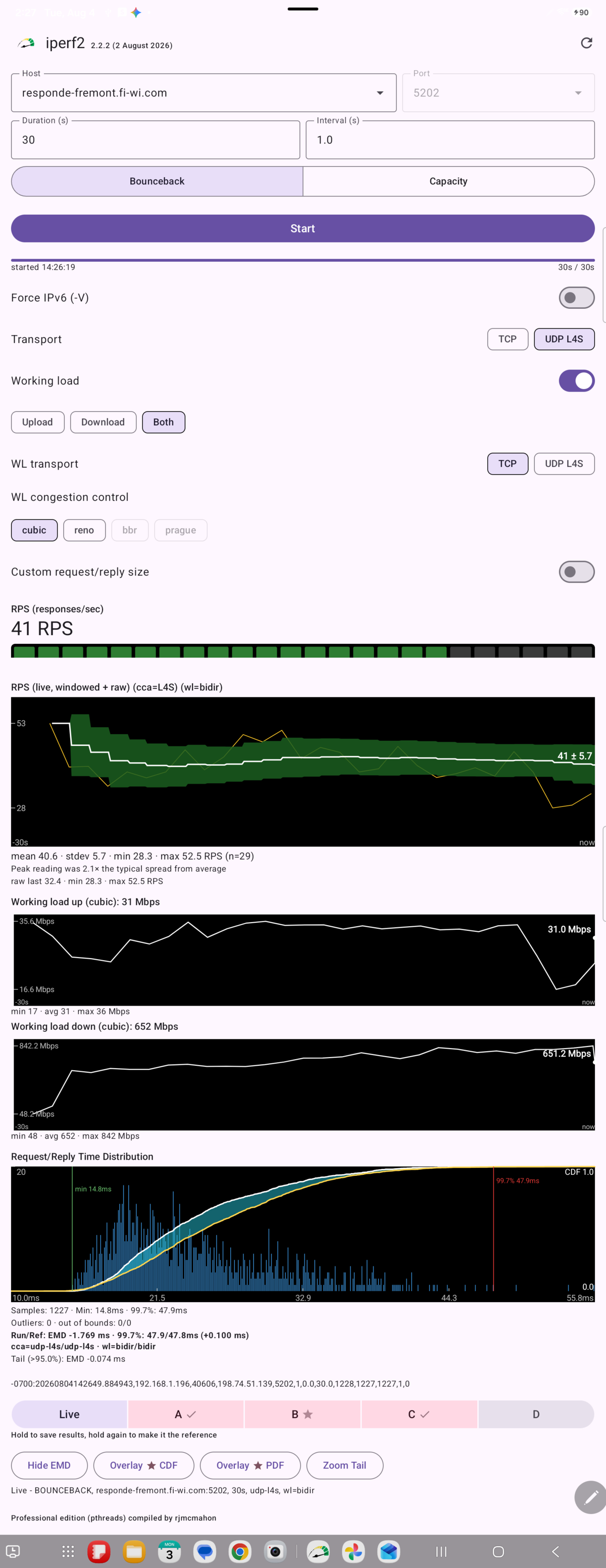 Live meters during a Bounceback test with working load — tap for the full screenshot
Round-trip responsiveness testing (request/response, measured in RPS), not idle-network
latency — see Bounceback above for the underlying protocol. With
Working load on, the app runs a concurrent background stream underneath the responsiveness
probes (the client-side equivalent of --working-load), so you can see how round-trip times
hold up when the link is actually busy. A Pause/Resume working load control can stop the
background load's writes mid-test without tearing the connection down, in either direction. Completed
runs can be saved into one of four A/B/C/D slots and compared against a starred reference, with CDF/PDF
overlays and an Earth Mover's Distance (EMD) divergence stat.
Capacity
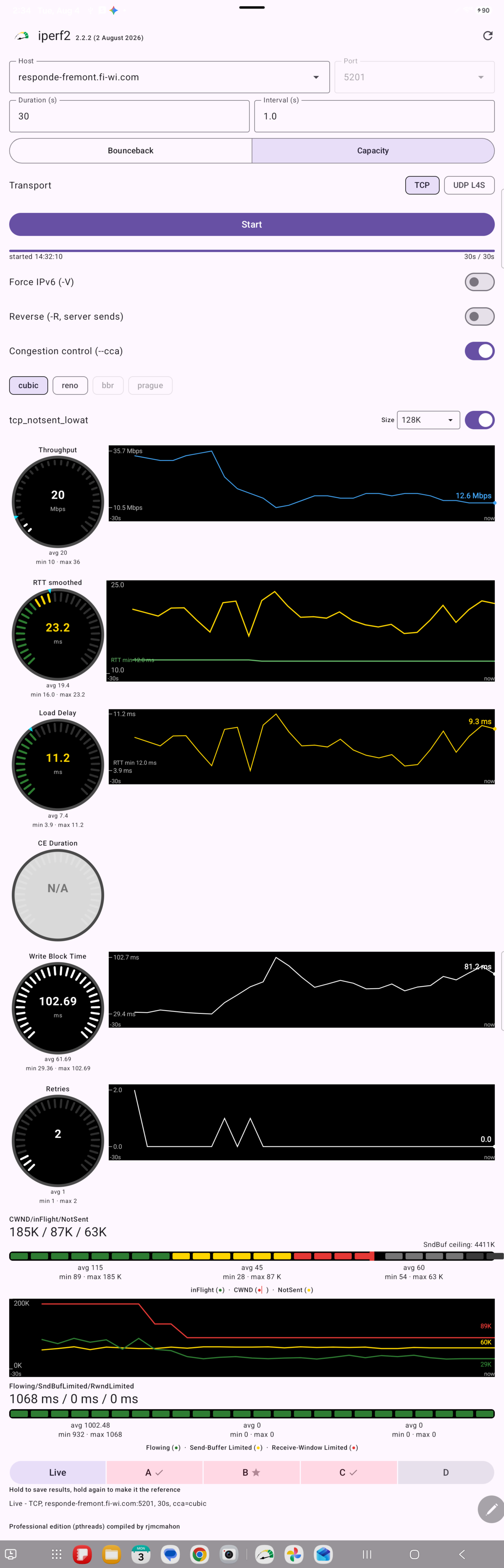 Live meters during a Capacity/TCP test — tap for the full screenshot
Continuous throughput testing. Over TCP: Throughput, RTT smoothed (with a tracked RTT floor), Load
Delay (current RTT minus that floor), CE Duration, Write Block Time, Retries, and a combined
CWND/inFlight/NotSent chart, with an optional congestion-control algorithm selection
(cubic/reno/bbr/prague, subject to device kernel
support).
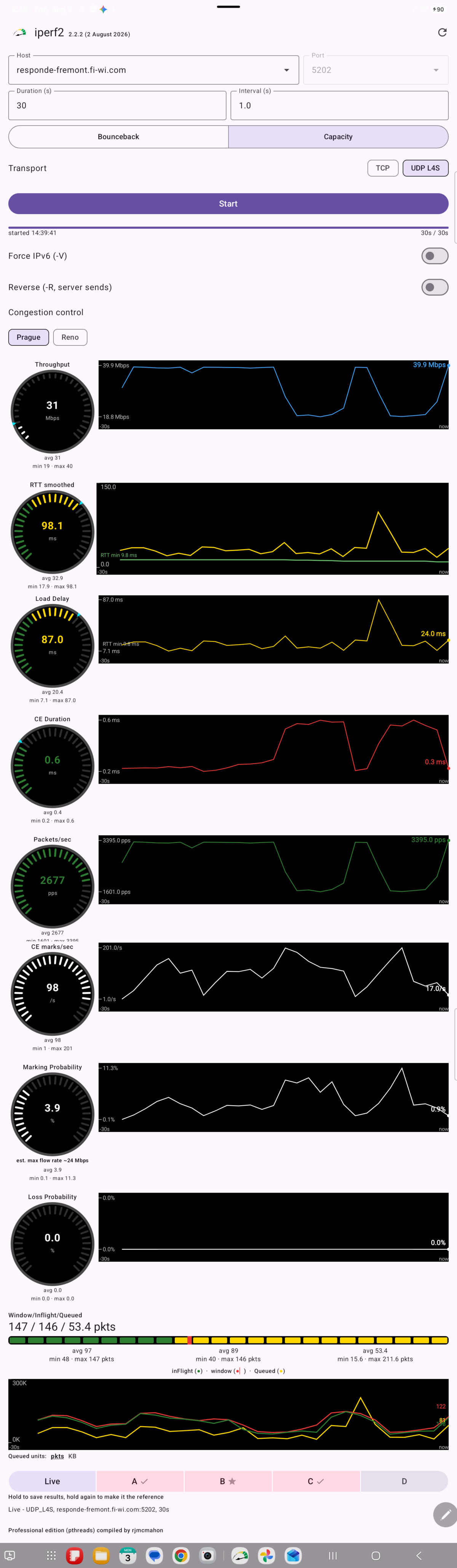 Live meters during a Capacity/UDP L4S test — tap for the full screenshot
Over UDP L4S: the same Throughput/RTT/Load Delay/CE Duration meters plus Packets/sec, CE marks/sec,
Marking Probability (with an estimated max flow rate, r = 1/p − 1 Mbps per published L4S
guidance), Loss Probability, and a Window/Inflight/Queued chart — the UDP L4S counterpart of
TCP's CWND/inFlight/NotSent view. Congestion control here is always either Prague (the
default) or Reno, see --cca above.
Permit Key
For non-local hosts, the app sends a permit key automatically and silently — no setup is needed
to test against the app's own built-in servers. To point the app at your own permit-key-gated server
(see --permit-key under Server Options above) instead, tap
Advanced just under the Host/Port fields to reveal a Permit key field. It's
saved per-host: switching hosts automatically swaps in that host's own saved key (or leaves the field
collapsed if none is saved), and a clear button forgets a host's key in one tap.
The Android app's own manual, kept in sync with the current build, is published at iperf2.sourceforge.io/site/index.html — this appendix is a summary of it.